728x90
인텔리제이(Intellij) 프로젝트 (톰캣)실행시 콘솔 로그에 한글이 깨져 보이는 문제가 있다.
2025-03-14 12:54:47,496 DEBUG ~[Properties Service] ������Ƽ key = pageUnit, �� = 10 �� �� �������Ͽ� ���ǵǾ� �ֽ��ϴ�.
2025-03-14 12:54:47,496 DEBUG ~[Properties Service] ������Ƽ key = pageSize, �� = 10 �� �� �������Ͽ� ���ǵǾ� �ֽ��ϴ�.
2025-03-14 12:54:47,713 DEBUG ~ getPathProperty : /workspace/eGovTest/out/artifacts/eGovTest_war_exploded/WEB-INF/classes/egovframework/egovProps\globals.properties = Globals.SMEConfigPath
이 문제를 해결하기위해 Run/Debug Configurations 팝업 창에서 VM options 다음과 같이 추가한다.
-Dfile.encoding=UTF-8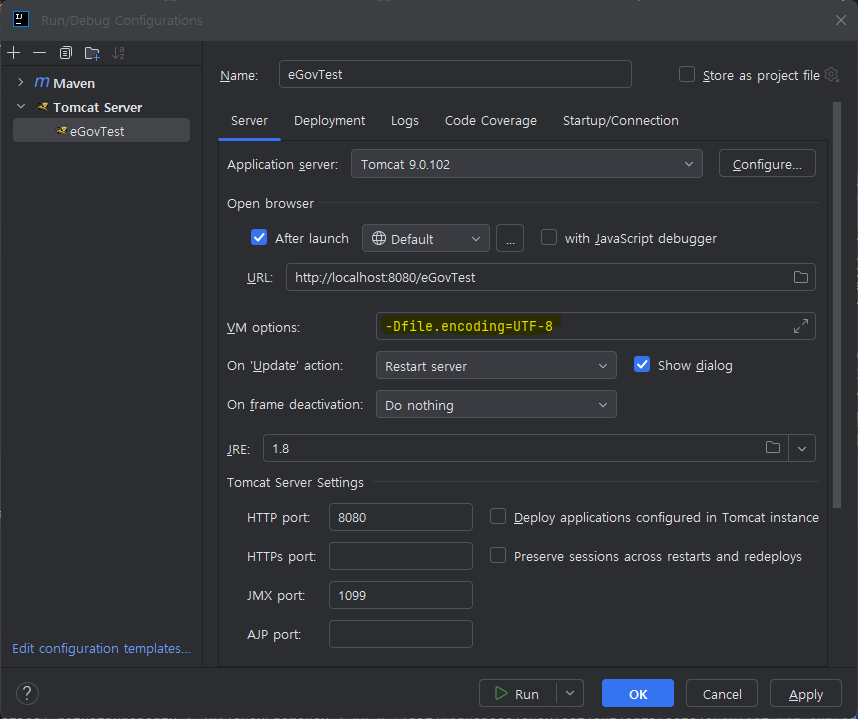
옵션 추가후 실행(Run)을 하면 콘솔창에 아래와 같이 한글이 정상적으로 표시된다.
2025-03-14 12:57:21,049 DEBUG ~[Properties Service] 프로퍼티 key = pageUnit, 값 = 10 은 이 설정파일에 정의되어 있습니다.
2025-03-14 12:57:21,049 DEBUG ~[Properties Service] 프로퍼티 key = pageSize, 값 = 10 은 이 설정파일에 정의되어 있습니다.
2025-03-14 12:57:21,291 DEBUG ~getPathProperty : /workspace/eGovTest/out/artifacts/eGovTest_war_exploded/WEB-INF/classes/egovframework/egovProps\globals.properties = Globals.SMEConfigPath
728x90